TIP
Copy and paste this page into a Google Doc to answer questions.
Homework 4: Producing Widgets
- Find the top menu bar, and go to View > Coding
- Choose either ‘Add UL/TSX’ or ‘Add Code’ depending on what you plan to code
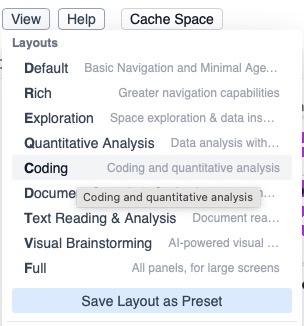
Activity 1: Coding a Search Bar
- Open the MantisCoder.
- Prompt it to create a search bar.
- Paste the code in the respective locations.
- Analyze your functioning search bar.
Answer these questions:
What prompt did you give to MantisCoder to generate your search bar?
Did the search bar work the way you expected? Why or why not?
If you wanted to improve your search bar, what’s one feature you’d add?
Activity 2: Creating Your Own Widget
- Open the MantisCoder.
- Prompt it to create a another feature.
- Paste the code in the respective locations.
Paste a picture of your functioning widget here:
Answer these questions:
What feature did you implement and why?
What prompt did you give to MantisCoder to generate your search bar?
Did the feature work the way you expected? Why or why not? Make sure to:
- Analyze your mistakes
- Fix them
- Explain what you did differently.