Quicksheets
Overview
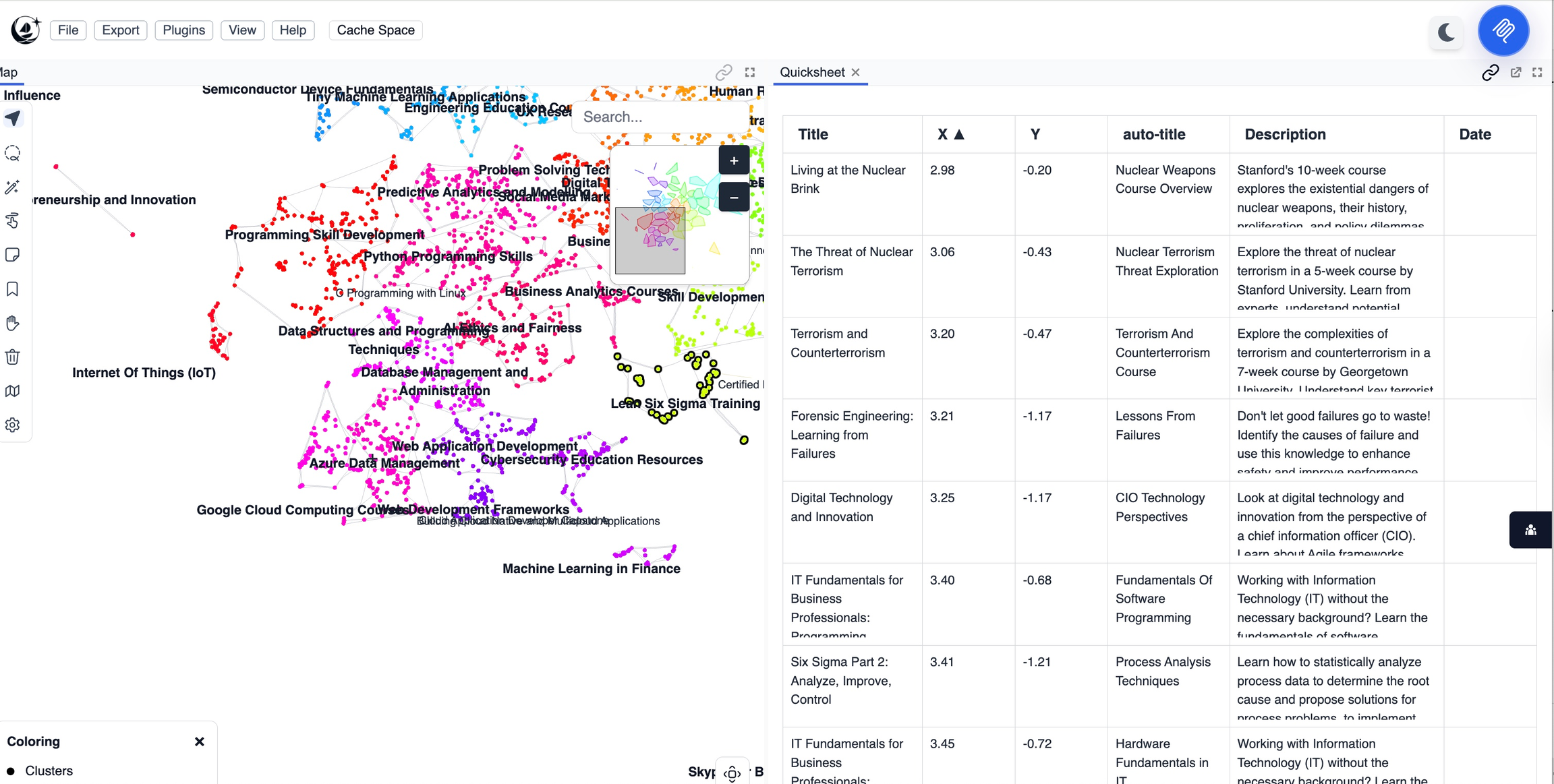
The Quicksheets panel adds spreadsheet-style editing and bulk annotation right into your Mantis workspace.
It connects map-based navigation with quick data operations, allowing you to efficiently review, organize, and tag clusters, bags, or selected points—all in a familiar tabular view.
Purpose
- Provides a fast, intuitive way to edit, label, or filter points, clusters, or bags in table form.
- Enables bulk actions such as tagging, merging, splitting, or exporting subsets.
- Instantly syncs edits with your visual and semantic maps.
Key Features
- Rearrange columns and data with drag-and-drop ease.
- Select multiple cells to view an instant summary of their contents.
Tips
- Use Quicksheets to quickly scan and flag suspicious or mislabeled points before exporting or running analysis.
- Select an entire cluster or bag, and tag everything at once to speed up annotation.
- Rearrange columns to match your workflow—for example, move “label” or “score” columns next to your selection to focus on what matters.
- Instantly check distributions (like values, types, or tags) by highlighting a set of cells—great for spotting inconsistencies fast.
- Edit or merge small groups of outliers in bulk instead of one by one.
- Great for real-time collaboration—multiple team members can clean up and relabel data together during a working session.